Case Study: Enterprise Operational Dashboard & Deliverable Architecture
How a personal productivity workaround on a temporary contract turned into a org-wide operational rollout and earned me street cred as a creative advocate.
Background
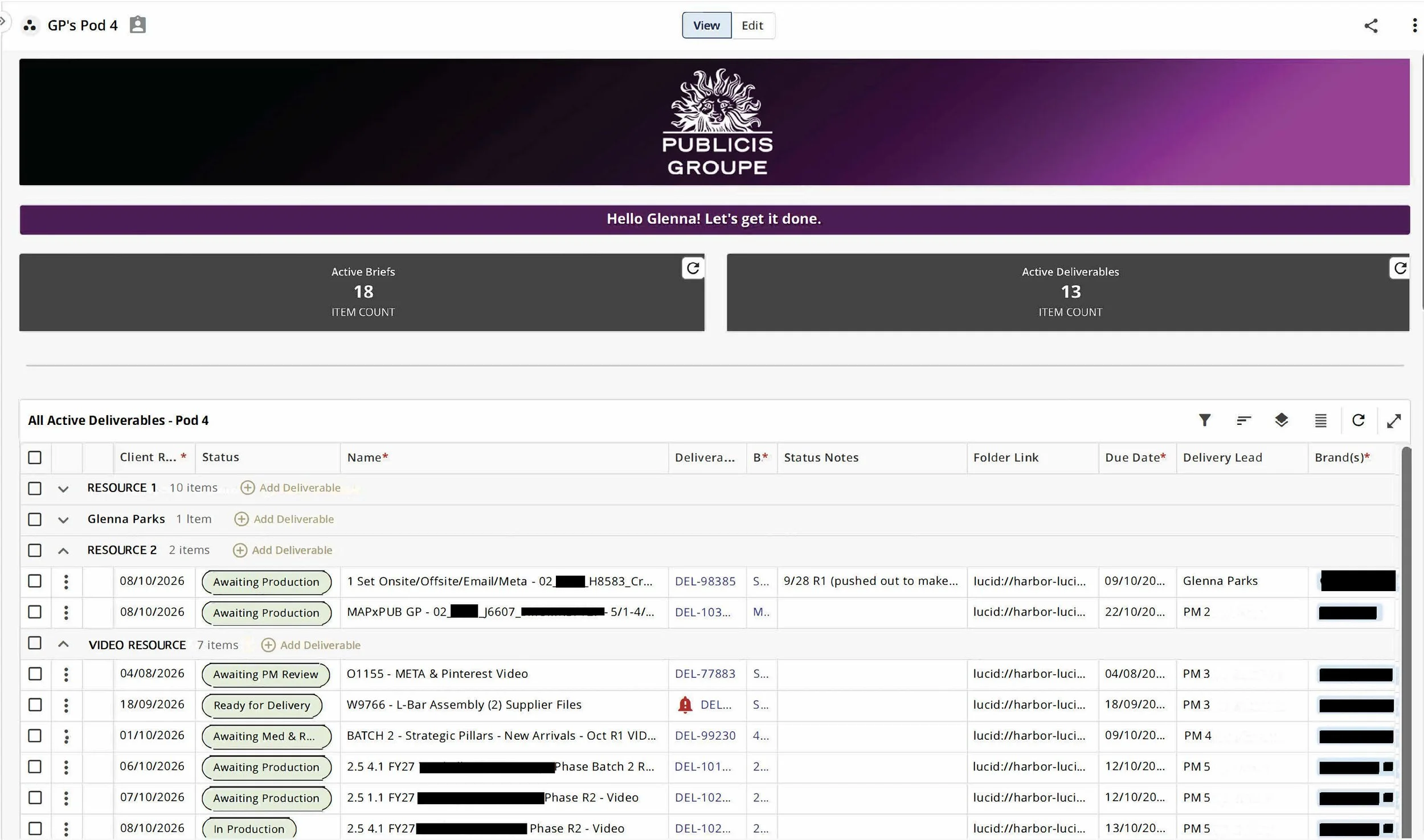
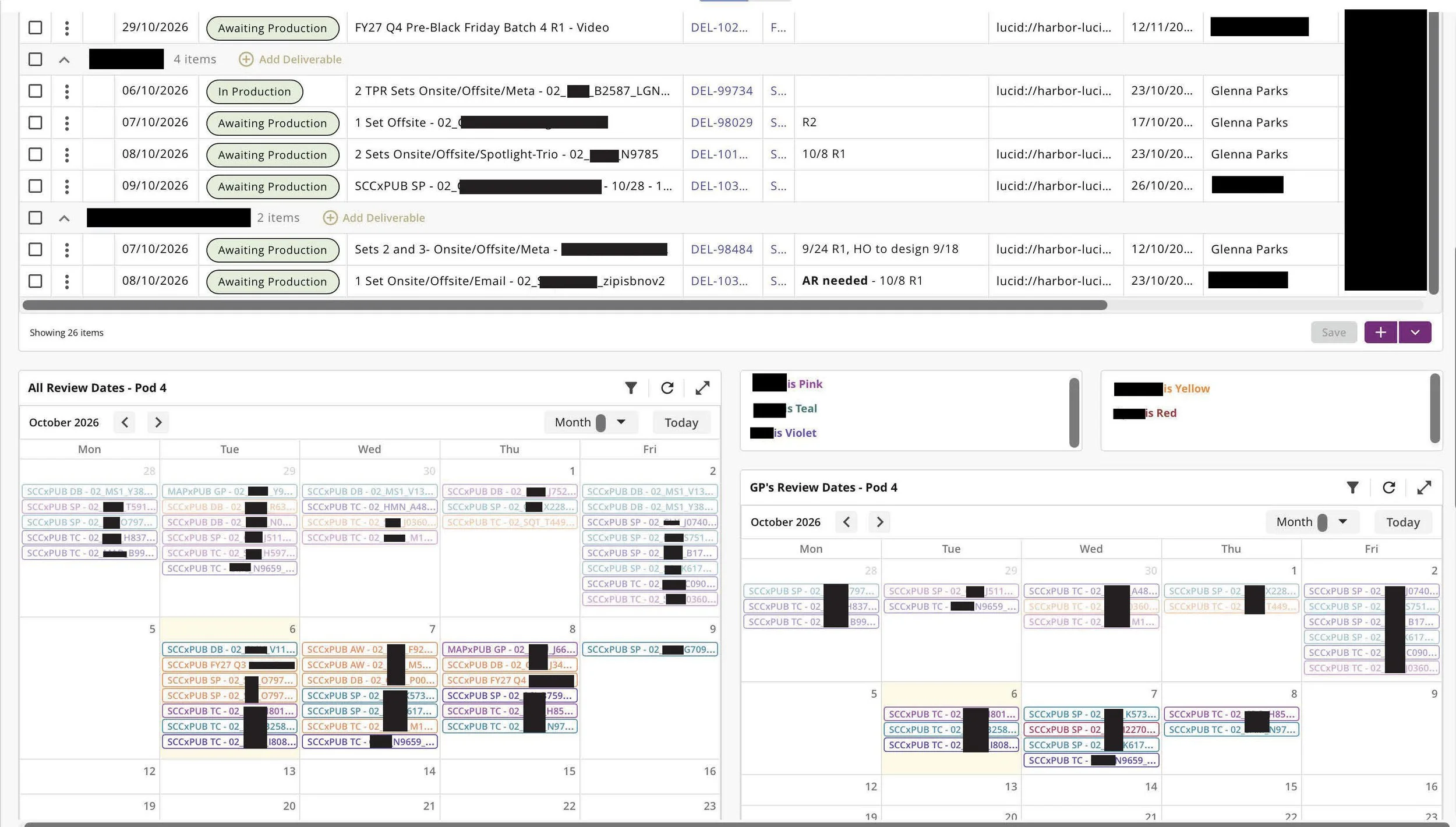
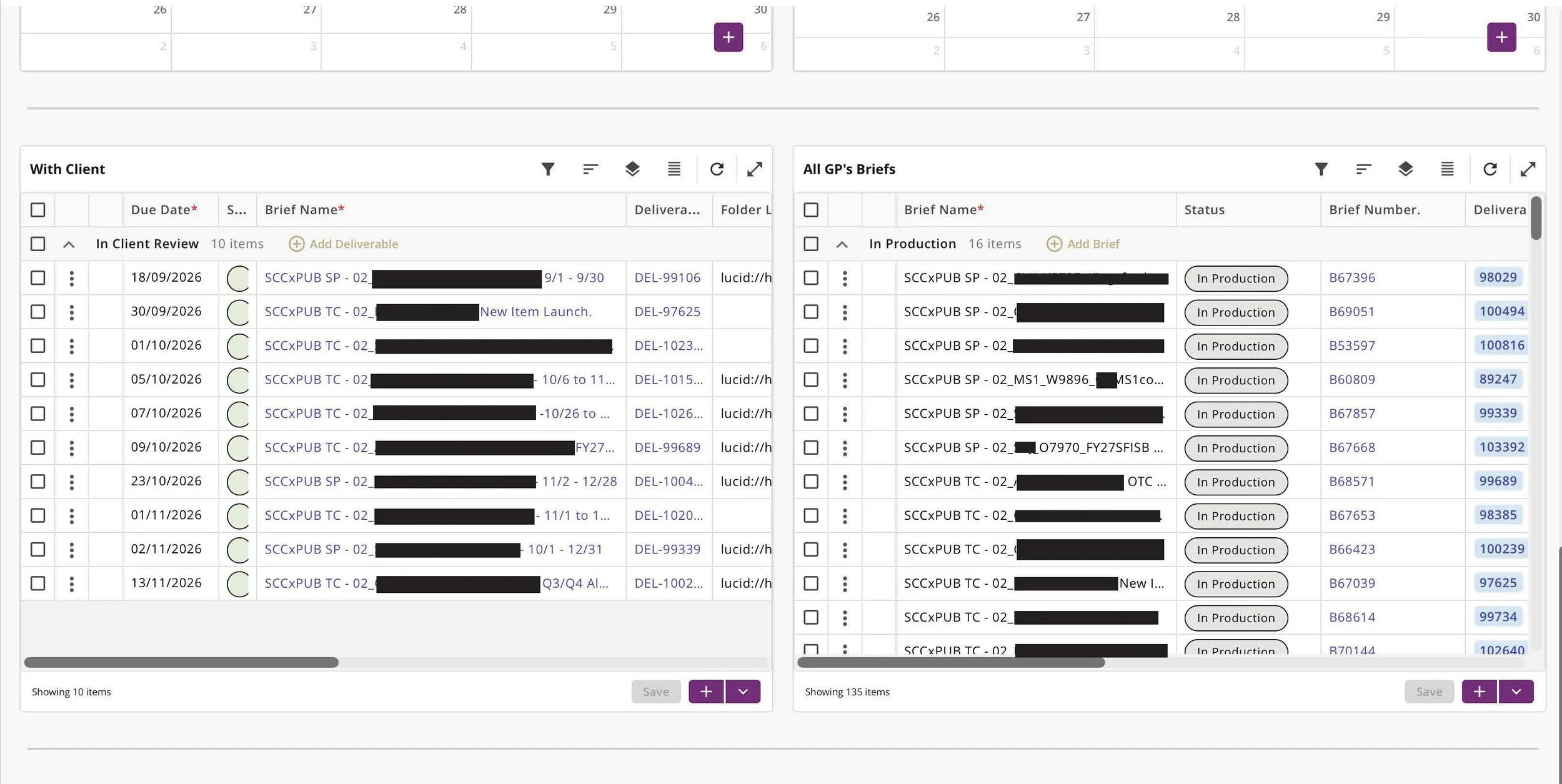
When I joined my first pod as a contract project manager at an international agency, the standard training was simple: we were given one giant Power BI list and told to bookmark specific spreadsheet filters. I soon realized I was spending my days constantly rotating through the same three tabs just to piece together what was actually happening. I’ve always been a curious customizer, and once I saw that Power BI had modular display options, I took bits and pieces of enterprise dashboards to build my own clean, 10,000-foot view of my team's workload.
Because I was on a temporary contract covering a leave, I was careful not to step on anyone’s toes or disrupt existing team workflows. I built this tool purely to make my own job easier.
Peer Validation & The Custom "Status Notes" Breakthrough
The first person to latch onto the dashboard was a fellow PM on my pod. It turned out she was drowning in those same three bookmarked tabs, too. Once I shared access with her, she raved about how clean and readable all the information was.
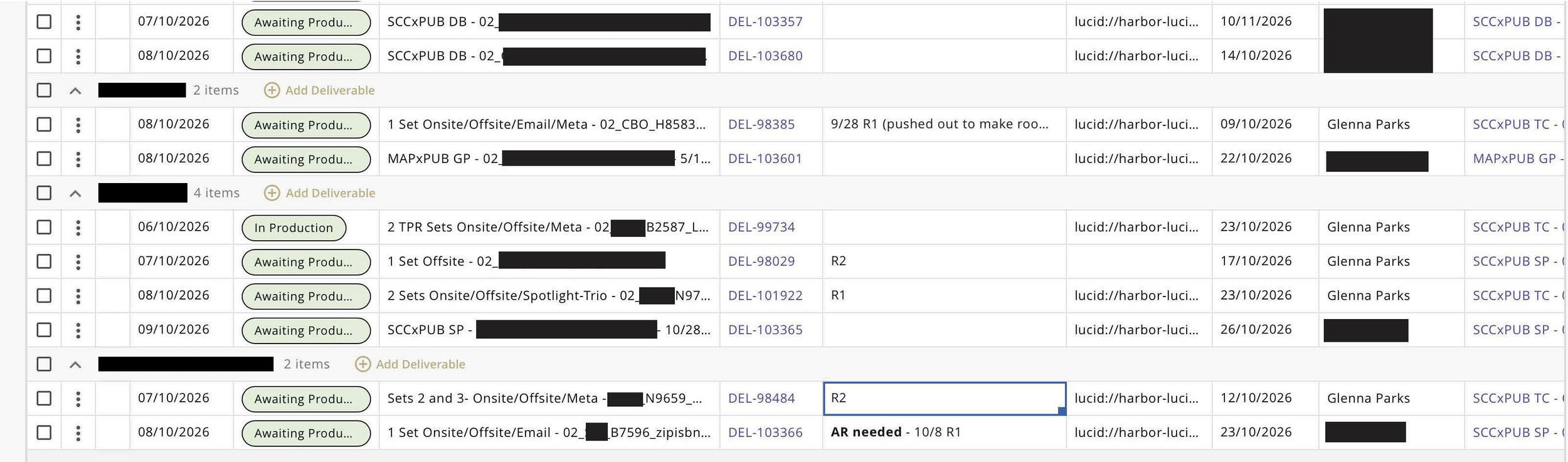
Over the next few months, I kept experimenting with modules to fine-tune the flow. What really got people’s attention was the customized Status Notes column. Instead of forcing team members to click into individual deliverables and dig through files and comments, this column was manually imputable so we could surface real-time details—like deliverable complexity, revision rounds, or crucial notes.
And once I realized that the notes followed the deliverable across dashboards…we were off to the races.
Key Takeaways
Solve Personal Friction First: The best operational tools start by fixing an actual day-to-day headache, not by imposing heavy top-down mandates.
Respect Team Dynamics: By introducing the tool thoughtfully as a personal helper rather than forcing a revamp, peers and leaders naturally sought to adopt it.
Design for Human Sanity: Visibility shouldn't just be about tracking deadlines—it should protect creative bandwidth, balance workload equity, and give teams room to breathe
Scaling to Pod 2: Taming the General Merchandise & Electronics Chaos
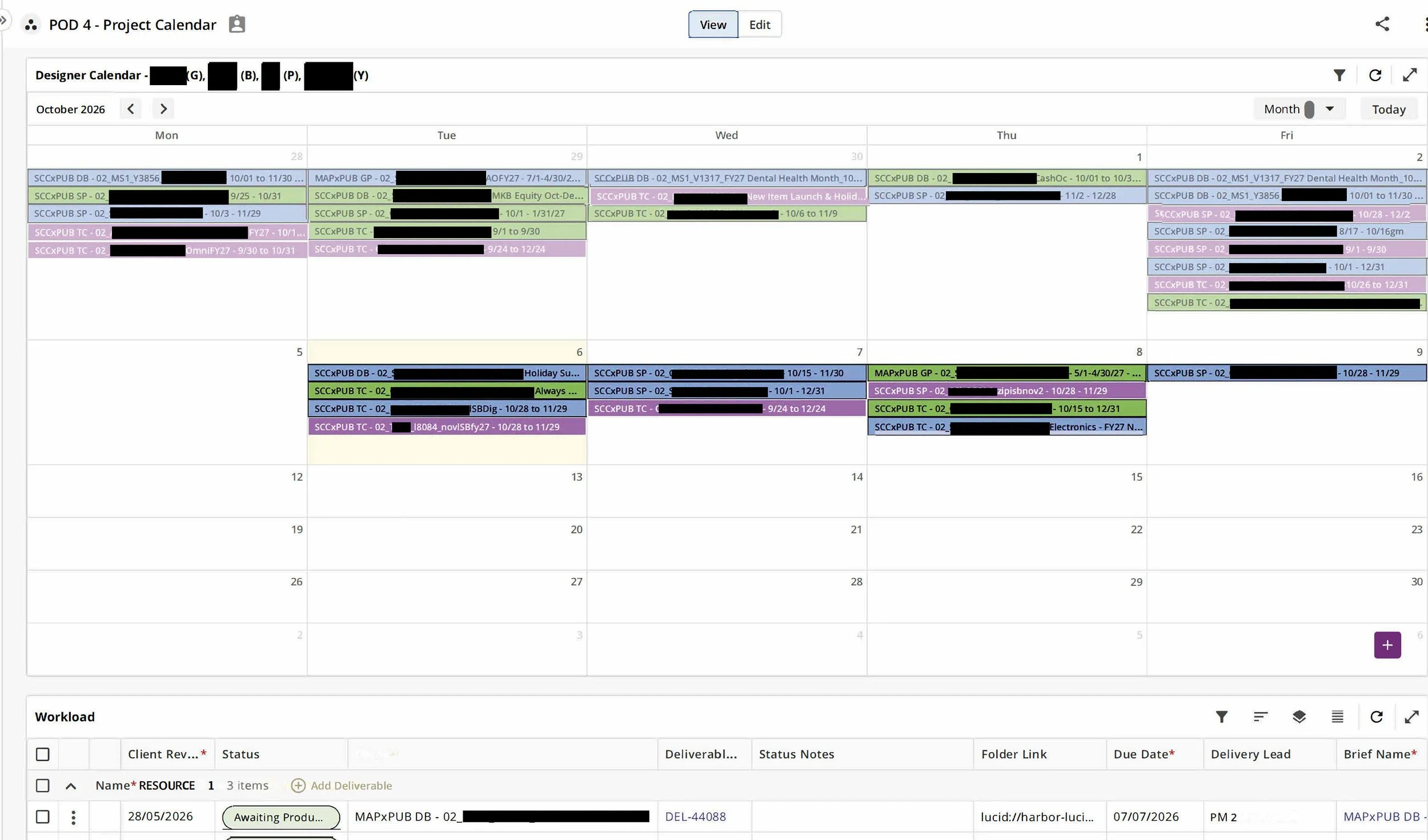
When I moved over to my second pod (General Merchandise & Electronics), their tracking was a total mess: they worked off a basic color-coded calendar paired with one massive, unorganized list of everything that had ever been due from anyone on the team. It showed what was due today, but completely hid what was actually sitting on a designer's plate long-term.
I adapted my deliverable widget into a simplified Workload Module and added it to their pod tracker. That’s when things really took off.
My Art Director had a ton of questions about how it worked, loved the setup, and suggested using the custom Status Notes column to request creative and asset reviews. By adding a bolded "AR" (Asset Review) indicator, he could instantly see on his dashboard when something required his review—saving him from managing his work through a chaotic email inbox.
Empowering Creatives & Winning Executive Traction
Suddenly, we could see exactly who was overutilized and who was underutilized, allowing us to balance the workload fairly across designers. The creative impact was huge: designers were no longer surprised by morning crunch periods; they could forecast their capacity, work ahead when they had breathing room, and avoid burnout. I earned huge kudos from the design team for being a true advocate for them, not just for client deadlines.
My Art Director shared the module with his peers and creative leadership. That sparked a broader conversation with operational leadership about how we could use this architecture across pods to balance resources and empower designers to cross-train on different project types.
Because my dashboard started that movement, I was invited into the leadership strategy meetings as a subject-matter expert, a trusted PM, and a proven servant leader.
Want to look under the hood? See the dashboards in full.